foco
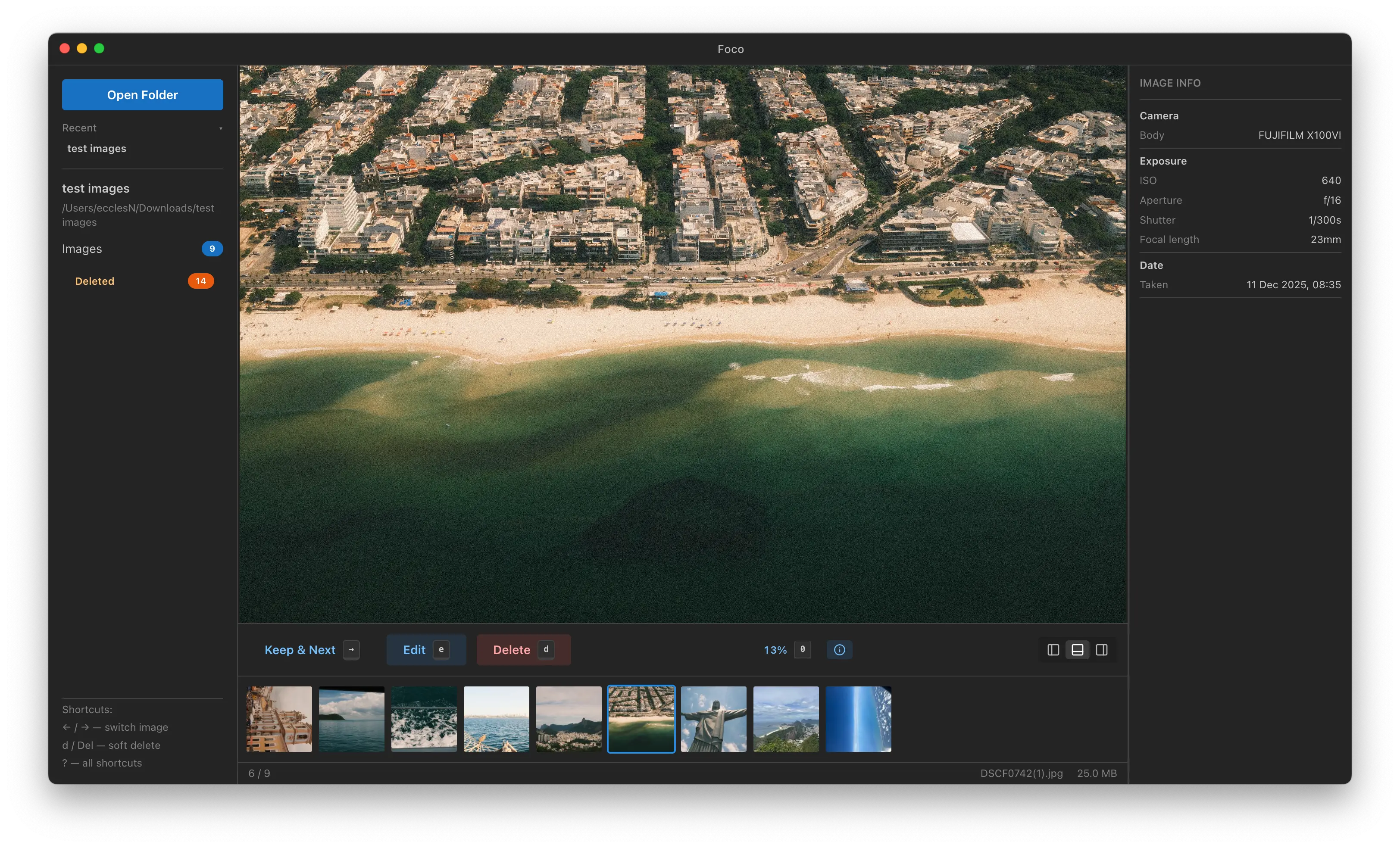
A fast, keyboard-driven desktop app for photo triage and light editing. Open a folder, cull your shots, crop and resize, and review EXIF metadata without leaving your machine.
Tech Stack
Overview
When travelling, I take a lot of photos. Those photos are large in size and finding which photos to keep is a challenge. I can’t always rely on cloud-based tools without an internet connection so I built Foco, a native desktop app focused entirely on the triage workflow.
The core loop is simple: open a folder, move through images with arrow keys, delete the ones you don’t want (soft-deleted to a _deleted/ folder so nothing is lost), and apply basic edits before exporting. The filmstrip along the side gives you a scrollable overview of the whole set at once.
Under the hood, Sharp handles all image processing, thumbnail generation, cropping, and resizing, via Electron’s IPC layer. Thumbnails are cached to disk with mtime validation so re-opening a folder is instant even for large collections. The filmstrip is virtualised with @tanstack/react-virtual so scrolling stays smooth regardless of how many images are in the folder.
The EXIF panel pulls camera body, lens, exposure settings, and GPS coordinates for each image. GPS locations are plotted on an embedded OpenStreetMap via React Leaflet, and a live RGB histogram gives a quick read of exposure without opening a separate tool.
The pan and zoom system uses ref-based transforms rather than React state to avoid re-renders on every wheel or drag event — cursor-anchored scaling and a double-click 1:1 toggle make it feel native. Keyboard shortcuts cover the full workflow, keeping hands off the mouse wherever possible.
Foco is still in development and more features are planned.
Screenshots
Key Features
- 1 Virtualised filmstrip with configurable orientation (bottom, left, right) for fast navigation through large collections
- 2 Crop and resize editor with live preview, plus Save As support for JPEG, PNG, and WebP
- 3 EXIF panel with camera metadata, exposure details, GPS map (OpenStreetMap), and live RGB histogram
Technical Challenges
-
Cursor-anchored zoom and pan using ref-based transforms to avoid per-frame React re-renders
-
Coordinate system conversion between image pixels, display space, and screen space for the crop overlay
-
Thumbnail cache invalidation and concurrent queue management (up to 4 in-flight Sharp operations) for large folders
Related Posts
Virtualised Lists with TanStack Virtual - Handling 10,000 Thumbnails
19 April 2026How I used @tanstack/react-virtual to keep a photo filmstrip smooth at any folder size
Building a Concurrent Thumbnail Queue with Sharp
28 March 2026How I built a queued, cached thumbnail pipeline for a desktop photo app without blocking the UI or overwhelming the system
Why I Built a Desktop Photo App in 2025 (and Why Electron)
19 March 2026How a travel photography problem led me to build a desktop app with Electron, React, and Sharp